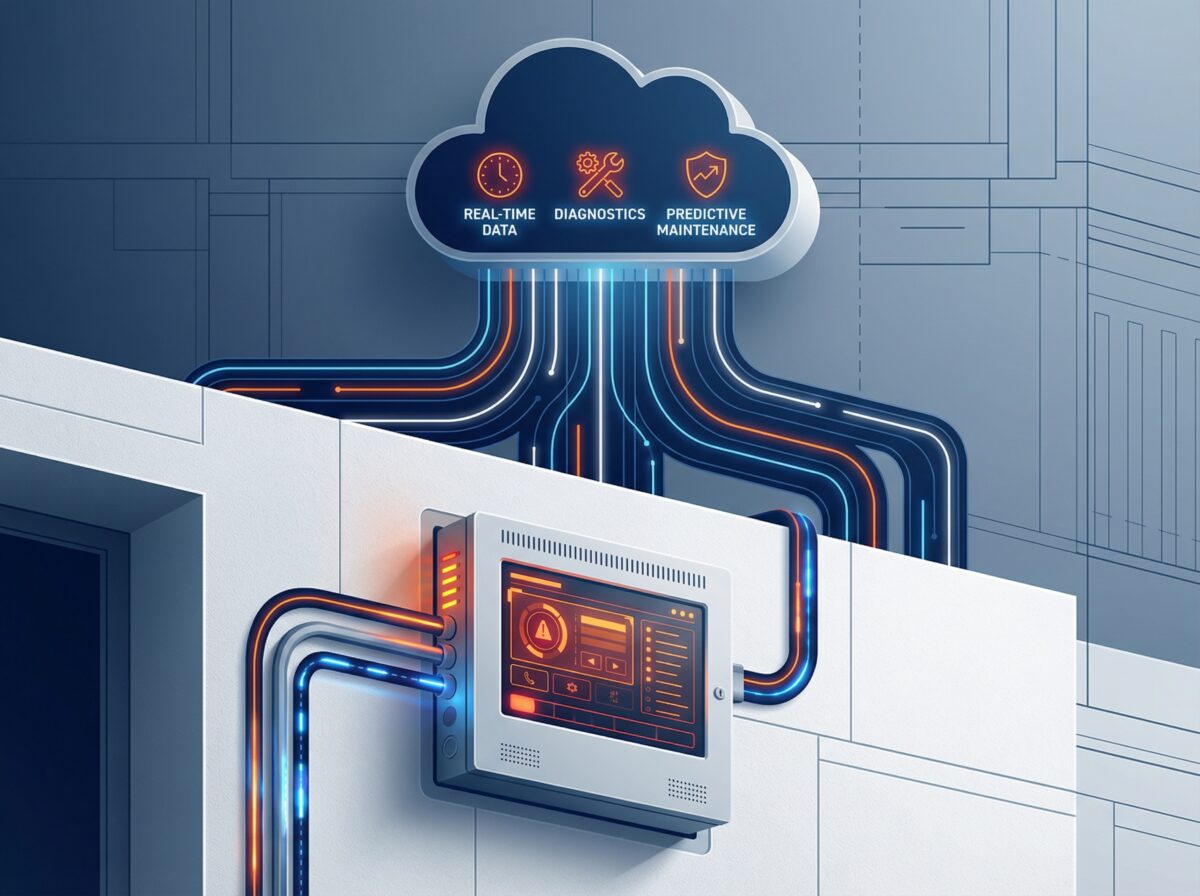
#Cloud-based fire alarm monitoring adds a layer of intelligence to traditional alarm monitoring.
Here’s what changes with cloud connectivity:
Traditional monitoring: Your fire alarm triggers → Signal sent to monitoring station → Operator dispatches fire department
Cloud-based monitoring: Your fire alarm system continuously streams data to cloud servers → Real-time device status available 24/7 → Problems detected before failures happen → Remote diagnostics reduce service calls
Key Differences:
- System visibility: See every device’s health in real-time, not just when alarms trigger
- Maintenance approach: Predict problems before they cause failures instead of waiting for trouble signals
- Diagnostics: Troubleshoot remotely before dispatching technicians to sites
- Documentation: Automated compliance records instead of manual paperwork
- Access: Check system status from anywhere via web or mobile app
What Cloud Monitoring Actually Provides:
| Feature | Traditional Monitoring | Cloud-Based Monitoring |
|---|---|---|
| Alarm signals | Yes | Yes |
| Device health data | No | Yes – continuous |
| Remote diagnostics | No | Yes |
| Predictive maintenance | No | Yes |
| Mobile access | Limited | Full 24/7 access |
| Automated reports | Manual | Automatic |
Cloud monitoring works alongside your existing UL-listed central station monitoring—it doesn’t replace emergency dispatch, it enhances system management and maintenance.
—
How Cloud Monitoring Works With Fire Alarm Systems
Cloud connectivity requires three components working together: on-site communicators, cloud servers, and user access points.
The Technology Components
On-Site Communicator:
This device connects to your Fire Alarm Control Panel (FACP) and transmits data to cloud servers. Connection methods include:
- Cellular – Works independently of building internet (most reliable)
- Internet/IP – Faster data transmission but depends on network stability
- Dual-path – Uses both cellular and internet for redundancy
The communicator continuously sends device status information—not just alarm signals. For addressable systems, this includes individual detector readings, battery voltage, power supply status, and communication quality.
Data transmission frequency: Every 3-10 seconds for addressable panels
Bandwidth requirements: Minimal (50-200 KB monthly)
Cloud Server Platform:
Remote servers receive and store data from connected fire alarm systems. These platforms:
- Process incoming data from all connected devices
- Store historical records (typically 1-5 years)
- Run analytics to identify patterns
- Generate alerts for troubles or maintenance needs
- Provide secure access through web portals and mobile apps
User Access:
Building owners and fire protection technicians access data through:
- Web portals (full dashboard access from desktop)
- Mobile apps (iOS and Android for remote monitoring)
- Email alerts (automated notifications for specific conditions)
- SMS messages (critical alerts requiring immediate attention)
What Gets Monitored in Real-Time
For Addressable Fire Alarm Systems:
Smoke Detectors:
- Current smoke density readings (0-100% scale)
- Contamination levels (dust buildup tracking)
- Sensitivity drift over time
- Temperature readings (multi-sensor detectors)
Heat Detectors:
- Current temperature measurements
- Rate-of-rise data
- Historical temperature patterns
System Components:
- FACP power supply voltage
- Battery voltage and charge status
- Communication signal strength
- Signaling Line Circuit (SLC) loop integrity
- All trouble conditions
For Conventional Systems:
Cloud monitoring provides less granular data since conventional panels group devices into zones rather than individual addresses. However, you still get:
- Zone alarm status
- Panel power and battery conditions
- Communication integrity
- General trouble conditions
Data Analysis Capabilities
Cloud platforms identify patterns that manual monitoring would miss:
Contamination Detection:
- System notices a detector’s ambient smoke readings gradually increasing
- Normal baseline: 0-2%
- Current readings: 5-8%
- Platform predicts detector will reach false alarm threshold within 2-3 months
- Technician schedules cleaning during next routine service visit
Battery Degradation:
- Platform tracks battery voltage measurements hourly
- Identifies shorter charge retention periods over time
- Detects faster voltage drops under load conditions
- Predicts battery failure within 30-60 days
- Replacement gets scheduled before failure occurs
Environmental Factors:
- Multiple nuisance alarms occur in specific zones
- Platform correlates timing with HVAC startup schedules
- Cross-references with humidity data showing moisture spikes
- Identifies steam from HVAC condensation as trigger source
- Recommends detector relocation or type change
—
Practical Benefits for Fire Protection Service
Cloud monitoring changes how fire protection companies deliver maintenance and support.
Predictive Maintenance vs. Reactive Service
Traditional Reactive Approach:
You wait for trouble signals or device failures, then respond. This means:
- Emergency service calls during after-hours (premium pricing)
- Unplanned downtime while waiting for technician arrival
- Possible multiple trips if correct parts aren’t immediately available
- Customer frustration with unexpected system issues
Cloud-Enabled Predictive Approach:
The platform identifies degrading components before failure:
- Device health monitoring shows declining performance trends
- Maintenance gets scheduled during normal business hours
- Technicians arrive with correct replacement parts
- Zero unplanned downtime from prevented failures
Cost Impact Example:
Emergency service call:
- After-hours dispatch: $300-450
- Rush parts procurement: $50-100
- Possible return trip: $150-200
- Total: $500-750 per incident
Scheduled preventive service:
- Regular business hours: $150-200
- Standard parts pricing: $30-50
- Single planned visit
- Total: $180-250 per intervention
Most commercial buildings average 3-5 unplanned fire alarm service calls annually. Cloud predictive maintenance can eliminate 60-80% of these emergency calls.
Remote Diagnostics and Troubleshooting
Traditional Process:
1. Building manager reports trouble signal on panel
2. Fire protection company schedules technician dispatch
3. Technician travels to site (30-90 minutes)
4. Diagnosis begins on-site (30-60 minutes)
5. May need return to shop for specific parts
6. Second trip to complete repair
Total time: 2-6 hours, often requiring multiple visits
Cloud-Enabled Process:
1. Cloud platform detects trouble condition automatically
2. Technician reviews system remotely (5-10 minutes)
3. Identifies exact problem and specific device location
4. Arrives on-site with correct replacement part
5. Completes repair and verifies through cloud connection
Total time: 45-90 minutes, single trip
Real Scenario:
Building reports “Fire alarm showing trouble condition”
Without cloud: Technician must physically check FACP, test devices in troubled zone, locate faulty detector, replace device, test entire zone.
Time required: 2-3 hours
With cloud: Review dashboard shows Device #142 lost communication. Check device history reveals gradual signal degradation over two weeks. Order replacement, schedule installation during next routine service.
Time required: 15 minutes diagnosis + 20 minutes installation (bundled with scheduled service)
Automated Compliance Documentation
Fire alarm systems require extensive documentation:
- Monthly visual inspections (NFPA 72 requirement)
- Quarterly functional testing
- Annual comprehensive inspections
- Device sensitivity testing
- Battery load testing
- Communication path verification
Manual Documentation Process:
- Technician carries paper forms or tablet
- Tests devices and records results manually
- Returns to office to type formal reports
- Files paperwork for record retention
- Generates reports for customer requests
- Labor time: 2-3 hours annually per system
Cloud-Automated Documentation:
- System automatically logs all tests and device activations
- Platform compiles compliance reports on demand
- Generates inspection documentation with timestamps
- Tracks next-due dates and sends reminders
- Customer accesses reports 24/7 through web portal
- Labor time: 10-15 minutes to review and approve
This automated approach satisfies most insurance requirements and provides ready documentation for Authority Having Jurisdiction (AHJ) inspections.
False Alarm Reduction Through Verification
False alarms cost building owners $250-1,000 per incident in fire department fines after initial “free” responses. They also waste emergency resources and erode occupant confidence in the system.
Cloud Verification Methods:
Multi-Sensor Correlation:
For addressable systems with multiple detector types, cloud platforms can analyze readings from adjacent devices before confirming an alarm:
- Smoke detector shows elevated reading
- Nearby heat detector reports normal temperature
- No rapid temperature increase detected
- HVAC system activation noted at same time
- Assessment: Likely steam or dust, not fire
- Building contact receives verification request before dispatch
Environmental Context:
Cloud systems consider building conditions and patterns:
- Time of day correlates with HVAC schedules
- Weather data shows high humidity conditions
- Historical records show this detector has nuisance alarms during HVAC cycles
- Enhanced decision-making reduces unnecessary emergency responses
Staged Response:
Cloud monitoring enables more sophisticated alarm protocols:
- Stage 1: Single detector activates → Building notification only, no dispatch
- Stage 2: Second detector confirms within set time window → Full alarm and fire department dispatch
- Manual override: Building staff can verify or cancel within response window
These verification approaches can reduce false dispatches by 40-60% while maintaining full protection for actual fire events.
—
Implementation Considerations
Adding cloud monitoring to existing fire alarm systems requires planning and proper setup.
System Compatibility Requirements
Addressable Fire Alarm Systems:
Most addressable panels manufactured after 2010 support cloud connectivity through:
- Built-in communication modules from original manufacturer
- Add-on communicator cards installed in panel
- Universal communicators compatible with multiple brands
Conventional Fire Alarm Systems:
Conventional panels can connect to cloud monitoring, but provide limited data:
- Zone-level information instead of device-specific readings
- Basic alarm and trouble status
- Power and battery monitoring
- Communication integrity verification
For maximum cloud monitoring benefit, addressable systems with device-level intelligence provide significantly more actionable data.
Wireless Fire Alarm Systems:
These systems typically include built-in connectivity options since they already use radio frequency communication for device networking. Cloud monitoring becomes an extension of the existing wireless architecture.
Connection Methods and Reliability
Cellular Connection (Most Common):
Uses commercial cellular networks independent of building internet infrastructure.
Advantages:
- No dependence on building network reliability
- Works during internet outages
- Simple installation with minimal IT coordination
Considerations:
- Requires adequate cellular signal strength at panel location
- Monthly cellular data plan costs ($10-30 typically)
- Signal can be affected by building materials in some locations
Internet/IP Connection:
Uses building’s existing internet infrastructure to transmit data.
Advantages:
- Faster data transmission speeds
- Lower ongoing costs if building internet is already paid for
- High bandwidth available for advanced features
Considerations:
- Vulnerable to network outages
- Requires IT department coordination
- May need firewall configuration for cloud access
Dual-Path Connection (Recommended):
Combines cellular and internet for redundant communication paths. If one connection fails, the other maintains cloud connectivity.
Cost: Additional $100-200 for dual-path communicator, plus cellular data plan
Security and Data Protection
Cloud-connected fire alarm systems require cybersecurity considerations:
Data Encryption:
- Information encrypted during transmission (typically AES-256 standard)
- Data stored on secure servers with encryption at rest
- Secure authentication required for access (multi-factor authentication supported)
Access Control:
- User permission levels limit who can view or modify settings
- Audit logs track all system access and changes
- Session timeouts prevent unauthorized access from unattended devices
Network Security:
- Fire alarm communicators connect outbound only (no inbound control possible)
- Cloud platforms cannot remotely trigger alarms or disable devices
- Communication uses secure VPN tunnels
- Regular security audits by platform providers
Important: Cloud monitoring platforms receive data from fire alarm systems but cannot control system functions. The FACP maintains complete autonomy for life safety operations regardless of cloud connectivity status.
Costs and Service Models
Initial Setup Costs:
- Cloud communicator hardware: $200-800 per panel (varies by features and brand)
- Installation labor: $150-400 per panel
- Platform setup and configuration: $0-500 (often waived)
Typical total initial investment: $350-1,700 per building
Monthly Recurring Costs:
- Cloud platform subscription: $30-100 per panel
- Cellular data plan (if applicable): $10-30 per month
- UL-listed central station monitoring: $30-80 per month (unchanged—still required)
Total monthly: $70-210 per building
This is approximately $40-130 more monthly than traditional monitoring alone. However, the cost difference is typically offset by:
- Reduced emergency service calls
- Lower false alarm fine expenses
- Faster troubleshooting reducing labor costs
- Prevented equipment failures
Service Provider Models:
Fire protection companies typically offer cloud monitoring through:
1. Included in service contract: Cloud monitoring bundled with preventive maintenance agreements
2. Separate monthly fee: Cloud monitoring as add-on service to existing monitoring
3. Tiered pricing: Different feature levels at different price points
—
Advanced Features and Capabilities
Cloud monitoring continues evolving with new capabilities becoming available.
Multi-Site Management Dashboards
For organizations with multiple buildings, cloud platforms provide unified oversight:
Portfolio View:
- See all connected fire alarm systems on single dashboard
- Filter by location, system type, or status
- Identify properties with active troubles across entire portfolio
- Track compliance status for all buildings simultaneously
Geographic Mapping:
- Visual map showing all monitored locations
- Status indicators for each site (normal, trouble, alarm)
- Quick navigation to detailed building information
Comparative Analytics:
- Benchmark performance across similar buildings
- Identify properties with above-average service needs
- Compare false alarm rates between locations
- Track maintenance costs by building or region
This capability particularly benefits property management companies, healthcare systems with multiple facilities, and educational institutions with campus-wide fire protection.
Integration With Building Management Systems
Cloud fire alarm monitoring can interface with other building systems:
HVAC Integration:
- Automatic shutdown commands when smoke detection occurs
- Zone-specific responses instead of building-wide shutdown
- Smoke damper status monitoring
- Return to normal operation coordination
Access Control Coordination:
- Automatic door unlock during fire alarm events
- Integration with badge readers for occupancy tracking
- Coordination with security systems during emergencies
Video Surveillance:
- Cameras near activated detectors automatically accessible
- Video verification of alarm conditions
- Recorded footage available for incident investigation
Elevator Systems:
- Elevator recall status monitoring during alarms
- Verification of proper emergency response
- Integration with fire service operation
These integrations require compatible systems and proper configuration, but can significantly enhance overall building safety coordination.
Mobile Applications
Modern cloud monitoring platforms include mobile apps providing:
Real-Time Notifications:
- Push alerts for alarm conditions
- Trouble signal notifications
- System offline alerts
- Scheduled maintenance reminders
Remote System Status:
- Current alarm and trouble conditions
- Individual device status (addressable systems)
- Battery voltage readings
- Communication signal strength
Historical Data Access:
- Event logs and alarm history
- Test records and compliance documentation
- Maintenance activity logs
- Device replacement tracking
Technician Features:
- Service call management
- Parts inventory lookup
- Customer contact information
- Work order documentation
Mobile access allows building managers and fire protection technicians to monitor systems from anywhere, improving response times and decision-making.
—
Choosing Cloud Monitoring Services
Selecting the right cloud monitoring platform requires evaluating several factors.
Platform Selection Criteria
Compatibility:
- Works with your existing fire alarm panel brands?
- Supports both addressable and conventional systems?
- Compatible with wireless systems if applicable?
- Universal communicators available for mixed equipment?
Features:
- Real-time device monitoring (what specific data points?)
- Predictive analytics capabilities
- Mobile app availability (iOS and Android)
- Multi-site dashboard (essential for multiple buildings)
- Automated compliance reporting
- Historical data retention period
Scalability:
- Easy to add buildings as you grow?
- Pricing model (per panel, per device, or flat fee)?
- User management for different staff levels
- API access for custom integrations
Support:
- Technical support availability (24/7 or business hours?)
- Training provided for platform use
- Documentation and help resources
- Onboarding assistance for initial setup
Data Ownership:
- Who owns the collected data?
- Can you export your historical data?
- What happens if you change platforms or providers?
Manufacturer-Specific vs. Universal Platforms
Manufacturer Platforms:
Companies like Honeywell, Siemens, and Johnson Controls offer cloud services designed specifically for their equipment:
Advantages:
- Deep integration with native panel features
- Access to advanced system functions
- Technical support from equipment manufacturer
Limitations:
- Only works with that manufacturer’s equipment
- May require proprietary communicators
- Less flexibility if you have mixed equipment brands
Universal Platforms:
Independent cloud services work with equipment from multiple manufacturers through universal communicators:
Advantages:
- Single platform for mixed equipment types
- Flexibility to choose best fire alarm equipment
- Often more cost-effective for multi-site portfolios
Limitations:
- May not access all advanced panel features
- Requires compatible universal communicators
- Integration depth varies by panel type
Questions to Ask Providers
Before committing to cloud monitoring services:
1. What fire alarm systems does your platform support? Get specific about panel brands and models.
2. What happens during internet or cellular outages? Understand backup communication and local operation.
3. Who can access our system data? Clarify user permissions and data privacy policies.
4. What’s included in monthly pricing? Distinguish between platform subscription and cellular data costs.
5. How is historical data retained and backed up? Verify data retention policies and disaster recovery.
6. What training is provided? Confirm onboarding process and ongoing support availability.
7. Can we export our data if we change providers? Ensure you’re not locked into proprietary formats.
8. What’s your uptime guarantee? Look for 99.9% or higher availability commitments.
Need expert guidance on cloud-based fire alarm monitoring for your building or facility? [Talk to an expert](/contact-us) at 48fire who can assess your current systems and recommend the right cloud monitoring solution.
—
Conclusion
Cloud-based fire alarm monitoring adds intelligent system management to traditional alarm monitoring services.
The technology doesn’t replace UL-listed central station monitoring or emergency dispatch—it enhances how you maintain and manage fire alarm systems between emergencies.
Key Takeaways:
What cloud monitoring does well:
- Provides continuous visibility into system health
- Enables predictive maintenance that prevents failures
- Reduces emergency service calls through early problem detection
- Automates compliance documentation and reporting
- Allows remote diagnostics that save technician time
What it doesn’t replace:
- UL-listed central station monitoring remains essential for emergency dispatch
- Local fire alarm system operation continues independent of cloud connectivity
- Regular physical inspections and testing still required by code
- Professional fire protection service expertise still necessary
The investment perspective:
Cloud monitoring adds $40-130 monthly compared to traditional monitoring alone. This cost is often offset by reduced service calls and prevented equipment failures, but the primary value comes from better system management and operational visibility.
For buildings with frequent service issues, multiple false alarms, or complex compliance requirements, cloud monitoring typically provides clear return on investment. For simple systems with minimal service needs, the additional cost may exceed the tangible benefits.
Making the decision:
Consider cloud monitoring if you:
- Manage multiple buildings needing centralized oversight
- Experience frequent false alarms or service calls
- Need detailed compliance documentation
- Want to shift from reactive to predictive maintenance
- Have addressable systems capable of providing device-level data
Traditional monitoring remains sufficient if you:
- Have small, simple systems with minimal service history
- Operate a single building with on-site staff
- Have conventional systems providing limited monitoring data
- Prioritize lowest possible ongoing costs
Cloud-based fire alarm monitoring represents the evolution of fire protection system management—providing the data and insights to maintain systems more effectively while keeping occupants safe.